A rebuilt iCloud account
Feedler 1.8.2, the next update, introduces a rebuilt iCloud account. Existing iCloud accounts will be updated automatically; new accounts will use the new system from the start. Other account types are unchanged. After several rounds of fixes, I decided to rebuild the iCloud account, to make it more reliable and safer for your data. It is lighter too: apart from your favorites, Feedler no longer stores your articles in iCloud, so the account takes less of your iCloud storage. This post explains what happens when you update, what changes compared with what you know, and the new tools that come with it.
What happens when you update
The first time you open Feedler 1.8.2, it updates your iCloud account on its own, in three steps.
- A backup first: Feedler keeps a copy of the account on the device, with your feeds, your folders and your favorites with their saved text.
- The update itself: Feedler updates how the account's data is stored in iCloud. This happens automatically, without a prompt. On my own devices, it took a few seconds, up to about fifteen.
- One sync: Feedler then syncs the account once, so the device is up to date.
Your feeds, folders, favorites and read states should remain unchanged. The update needs a connection. If the device is offline at that moment, it waits for the next launch.
Two things to know. Update all your devices to 1.8.2: until a device is updated, it still shares feeds and folders with the others, but not read states and favorites. And on the first device you update, Feedler also removes the old article data from iCloud after preserving the saved content of your favorites. During this cleanup, changes may take longer to reach your other devices.
What changes
Articles are no longer kept in iCloud, except your favorites. Until now, iCloud also held the list of your recent articles. From this update on, iCloud carries your feeds and folders, what you have read or starred, and the saved text of your favorites. Each device fetches the articles from the sites when it syncs. In practice, unread counts may differ between devices because each downloads articles independently and may keep a different article history. A device left closed for a few days shows the newest articles after its next sync. In Settings › Synchronization, Sync on launch is on by default and syncs every time you open Feedler.
Changing your feeds needs a connection. Adding, renaming, moving or deleting a feed or a folder of the iCloud account now needs iCloud to be reachable, so every device keeps the same list. Offline, Feedler says so and changes nothing. Reading and starring still work offline, and are sent when the connection is back.
Separate read states and stars for each copy of an article. If two of your feeds carry the same article, each copy now has its own read state and its own star.
One iCloud account, the one of your Apple Account. The iCloud account in Feedler belongs to the Apple Account signed in on the device. If another Apple Account signs in, Feedler shows that account's feeds instead. Nothing is deleted in anyone's iCloud, but what had not reached iCloud yet at that moment, such as articles read or starred offline, is lost.
What stays the same. A feed deleted on one device is deleted on all of them, with its read states and its favorites. Removing the iCloud account from Feedler on one device deletes nothing in iCloud. Everything goes through your own private iCloud, and Feedler has no server of its own.
Resync from iCloud
This is a new command to use if a device ever gets out of sync. Long-press the iCloud account and tap Resync from iCloud. On iPad and Mac, it is in the account menu at the top of the sidebar. Feedler rereads all the account data stored in iCloud, including changes and deletions made on your other devices, then syncs and tells you when it is done. It never erases anything in iCloud.
It can also run on its own, once a day or once a week, with Manage Account › Maintenance › Automatic resync from iCloud. It is off by default.
Backup and restore
The iCloud account now has a backup on the device, in Manage Account › Backup. It can hold up to three copies.
- Your own backup: Back Up Now keeps a copy of the account's feeds, folders and favorites with their saved text. Feedler asks before replacing it.
- An automatic backup: once a day at most, when the account starts to sync. It never replaces your own.
- The backup from before the update: taken once, at the first launch of 1.8.2, and kept.
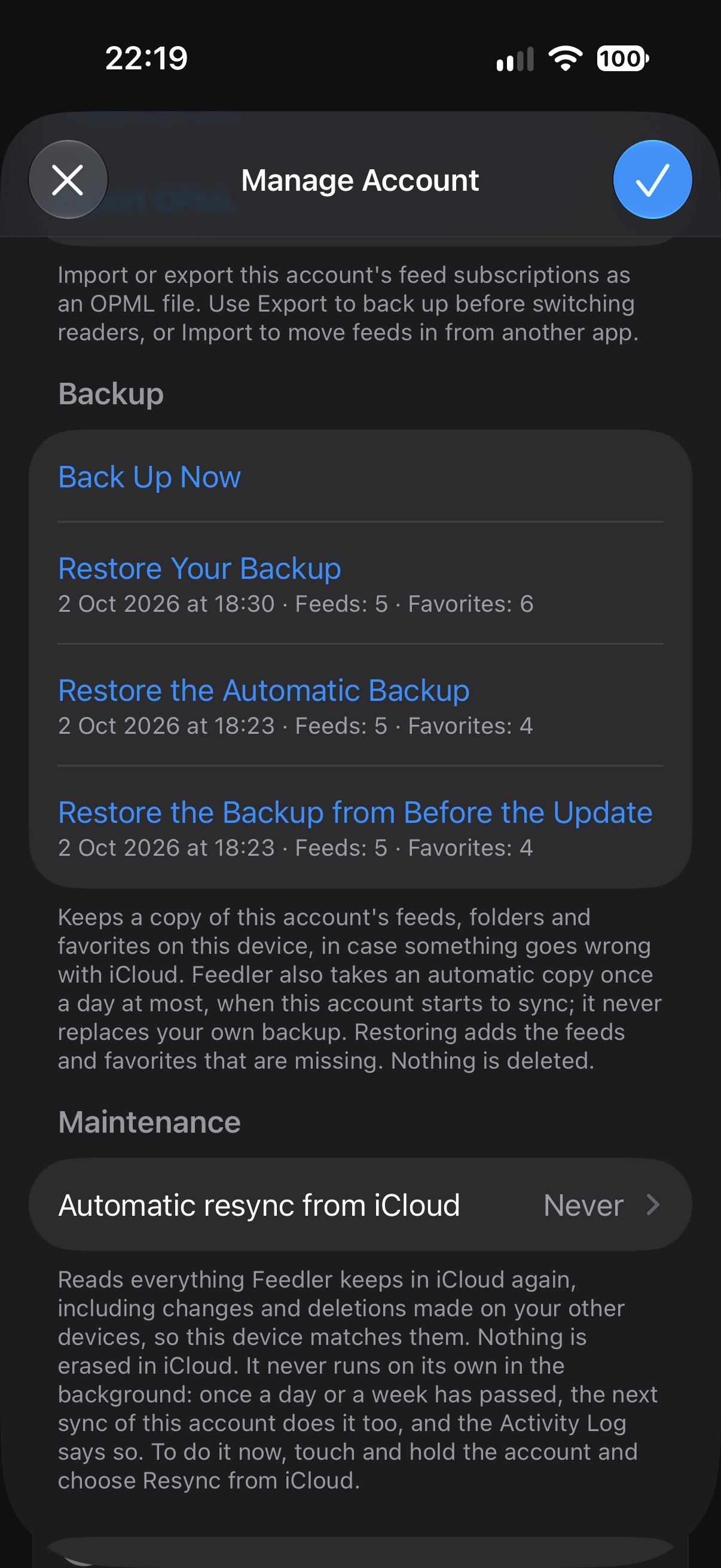
Restoring a backup adds the feeds and favorites that are missing, and tells you how many before it starts. Nothing is deleted and nothing that is already there is changed. What comes back is sent to iCloud, so your other devices get it too.
The backup has limits. It stays on the device. Deleting Feedler also deletes these local backups. It holds your feeds and your favorites, not what you have read: when a restored feed syncs again, its other articles come back as unread.
If something looks wrong
If your account looks different after the update, don't delete it. Try Resync from iCloud first, and write to me if the problem persists. The backup taken before the update can put your feeds and favorites back.
The details are in the FAQ: “How does the iCloud account work?”